 |
|
Modding your XBOX for Dummiesby Kirk, 2006-04-03 |
||||
2. How do I do it?Okay, first, and this is VERY important- go get yourself everything below: + A XBOX console in working condition ($130+) + Action Replay for the XBOX ($20 or so) + An ORIGINAL COPY (NOT GREATEST HITS COPY) OF ONE OF THE FOLLOWING GAMES: - Tom Clancy's Splinter Cell (Any version) - 007: Agent Under Fire (Serial Number: 1448517 ) - MechAssault (Serial Number: MS02301L) + A PC with a free USB connector, and obviously Internet access - On it, download the "XBOX Deluxe Softmod Installer" from our Download section. + If at all humanly possible, the ability to connect your XBOX to your network, if you have one. So, when you're done, you should now have the ability to softmod your XBOX. Chances are, you already have one of the above games, as they are very popular. As I've found, the issue tends to be the Action Replay, but being only $20-30, it's a small price to pay for unlimited fun afterwards. Also, as I mention, it helps to have an Ethernet cord and a network- this is because you can run your XBOX as an FTP to upload files. This beats the hell out of doing the alternative and burning everything to DVD-R discs. Now for the actual instructions. First off, take your Action Replay and install the program included on the CD. This program will configure your PC to allow you to drag and drop necessary files from your PC to your Memory Card (The one included with AR works fine), which you can hook up via the USB Cable. Take the Action Replay program and drag and drop the files from the Installer (Which, you only need the particular installer for your game, there are two for Splinter Cell and only one each for AUF and MechAssault) onto the memory card. Now, unplug the Memory Card. Go to your XBOX and turn it on without a game in the disc tray and use the Memory Card manager to transfer all saves to your XBOX Hard Drive. This is especially important for Splinter Cell, which requires two trips, as the Action Replay card is too small to hold both saves at once. FOR SPLINTER CELL Boot Splinter Cell. Hit "Load". There should be a game save named ?LINUX?. Press it, then press "Checkpoints". At this point, your screen should go black. Say hello to the hack. FOR AGENT UNDER FIRE Select "Start Mission" then exit that mission. Then go to the "Load Mission" command and load up the file your uploaded onto your Hard Drive. FOR MECHASSAULT Pending you have the right version of MechAssault, just like Splinter Cell, just go straight and load the save file. If you followed the instructions correctly and the saves transferred as they should have, then your screen should have gone black and switched to a blue-ish tinged screen with a big menu to it. If not, start from step one, deleting the copies off your hard drive and memory card, just to ensure they uploaded correctly. I have personally tested our download section's version, and it works correctly, so that should not be an issue. 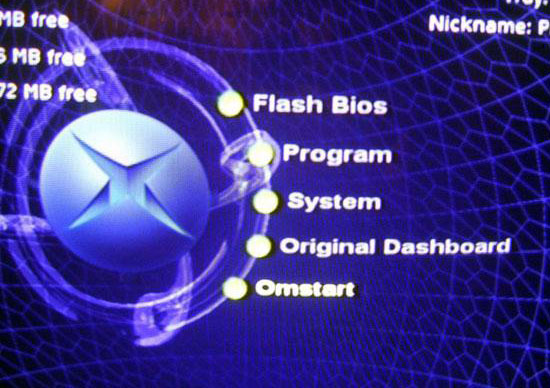 Now, and this is VERY IMPORTANT to read- follow these steps in exactly this order. Doing anything else or messing around may completely destroy your XBOX. While minor mistakes can be fixed if you know what you are doing, major mistakes are permanent losses. FIRST: Press "Create MS Backup". Wait till it completes. SECOND: Press "Create Mod Backup". Wait till it completes. THIRD: Select "Install Softmod" and select UnleashedX. Wait till it completes. DO NOT TURN OFF YOUR SYSTEM FOR ANY REASON. FOURTH: When you are absolutely sure it is completed (You can move your cursor), turn off your system and remove the disc from the game tray. If you followed those steps completely, rebooting it should result in the blue Unleashed screen, or the installer screen again. If it looks funky, try rebooting again, as it will configure itself. If you have followed those steps correctly, you should now have a Softmodded XBOX. 3. Fun things to do with your new toy.The following is a list of things I recommend to do with your wonderful new Softmodded XBOX: Install emulators. While I'm not saying you should illegally download games, if you have existing oldschool games, this is a great way to play them again without having to find your old system. Install XBOX Media Center. This is definitely your best choice, as it allows you to watch videos, listen to music, and view images. There is no doubt in my mind that this should be your program of choice, if not a replacement dashboard as I have. Install homebrew apps. Other than the obvious Softmod abilities (Such as a DVD player without the required remote), there are many games and applications floating around that may interest you. Modify existing games. With some technical wizardry I won't get into (For legal reasons), you can extract and copy the files from a disc to your hard drive and run it. That being said, games like Counter Strike for the XBOX, which are direct ports of the PC version, can be modified to your specifications. Some games in particular are poorly coded and easily modified in this way. Hook up on the free Online gaming networks that replace XBOX Live for free. Code your own stuff. If you have the source code, modifying a program to run on the XBOX is actually quite easy- try it sometime.
|
|
|||

